Our mobile app development services focus on a real task your customers or team need to complete. That could be booking a session, returning to learning material or using a new service. We help turn that need into a clear app experience.
Bookings without the back and forth
For appointment or class-based businesses, an app can let people see available sessions and manage their bookings. The useful detail is how your business actually works: different services, group sizes or locations can affect what the booking experience needs to include.
A service customers return to
If people use your service regularly, an app can put their account, saved information or learning material in one familiar place. Make the next useful action obvious, rather than adding features simply because other apps have them.
Your idea as a usable product
You may have an idea for a new service, not an existing business app. Explain who it is for and the problem it solves. That gives the design a clear purpose and helps identify what people need in a useful first version.
OUR MOBILE APP WORK
AI Explained:
Quiz & Learn
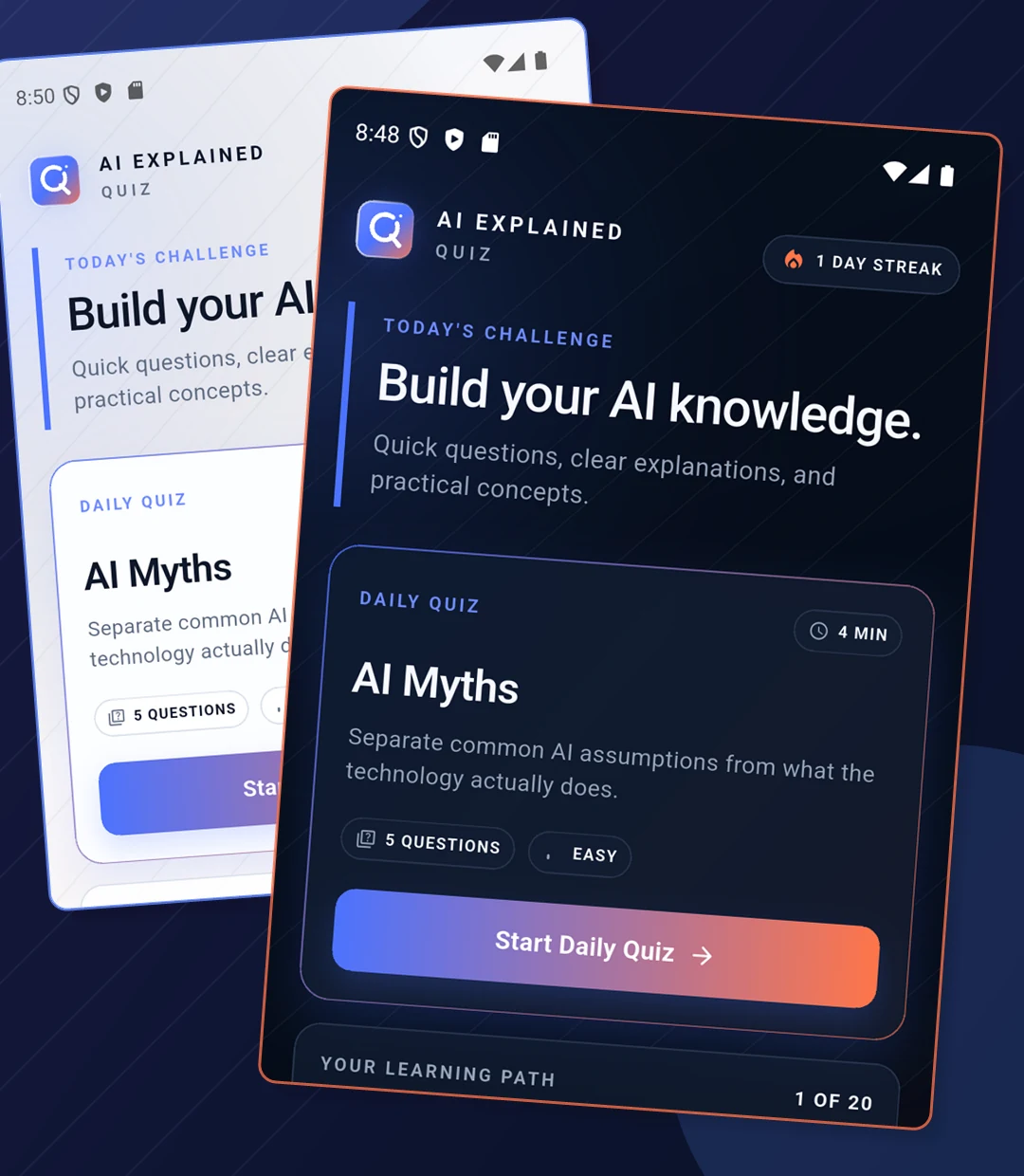
Our Android quiz app helps people learn AI concepts through short quizzes and clear explanations. The interface gives each activity a clear starting point, so users can focus on the learning.
Design choices users can see
The quiz screen brings the topic, number of questions and start button together. Light and dark themes give users a choice of appearance. Clear navigation helps them understand where to begin and what comes next.
If you are looking for an Android or iOS app development company, start with the people who will use your app. We can help you consider their devices, the task they need to complete and where they will use it.
Android
iPhone
Start with your audience
An Android app may fit an audience that mainly uses Android phones. An iPhone app may fit an audience that mainly uses Apple devices. If you already have customers, their device use is a useful starting point for this decision.
Think about where the app is used
Customers at home, staff working on site and people using an app while travelling can have different needs. If both Android and iPhone users need access, both platforms should be considered. A browser-based app may also suit some tasks.
FEATURES WITH A PURPOSE
Choose features that make a task easier.
Useful features depend on your service. A booking app and a learning app should not be designed around the same checklist. Here are examples to discuss for your own idea.
Bookings and reminders
Let customers find the right service and understand what they have booked. Where reminders are useful, the message and timing should support the customer rather than interrupt them.
Accounts and useful updates
An account can help people return to saved details or see the progress of a request. Only ask for information needed for the service, and keep the important updates easy to find.
Learning and progress
Short activities, clear explanations and a simple way to continue can help users stay oriented. This matters when your app teaches a skill or guides someone through a task.
EASE OF USE
An app people can understand without a lesson.
We design around the whole task, not only the first screen. The important action should be clear, with familiar labels and useful feedback. Your users should not have to guess which button to press or lose the information they have just entered.
Illustrative photography
Clear screens and readable content
Group related information, use familiar labels and give the main action enough space. If a form needs correcting, explain what to change in everyday language. These details make the experience easier to follow.
A focused first version
Choose one important problem and the features needed to solve it. You can learn more from people using a clear, useful first version than from a long list of features they do not need. Keep future ideas separate from the essential task.
LET’S TALK
Tell us what you want to build.
Tell us who the app is for, what they need to do and what is difficult about doing it today.
You can explain it in everyday words. You don’t need a technical specification to start a conversation.